大文件上传
分片上传
web worker
Web Worker 为 Web 内容在后台线程中运行脚本提供了一种简单的方法。线程可以执行任务而不干扰用户界面。这是MDN对于Web Worker的描述。简单来说就是不会阻塞页面中的UI渲染,因此非常适合用来处理耗时计算操作,即文件的hash计算。
文件分片
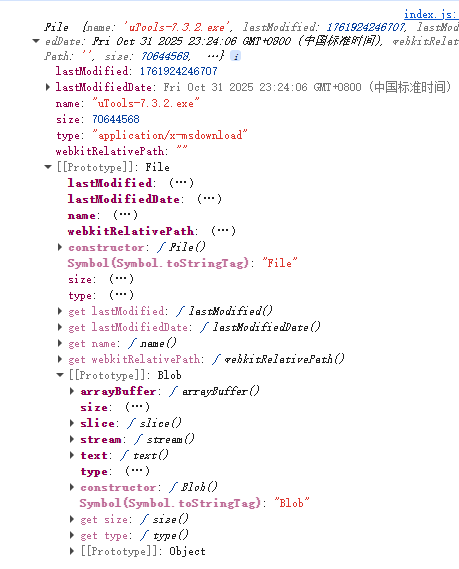
如图所示,File对象原型为Blob,具备slice的分片方法,因此可以利用该方法实现文件的分片。
js
const uploadBtn = document.getElementById('uploadBtn')
const fileInput = document.getElementById('file')
// 切片大小10MB
const chunkSize = 1024 * 1024 * 10
const chunks = []
const worker = new Worker('./worker.js')
uploadBtn.addEventListener('click', () => {
	// 读取文件内容
	const file = fileInput.files[0]
	const { size } = file
	// 计算总切片数
	total = Math.ceil(size / chunkSize)
	chunks.push(...Array.from({ length: total }, (_, i) => file.slice(i * chunkSize, (i + 1) * chunkSize)))
	// 向 worker 线程发送消息
	worker.postMessage({
		chunks,
		filename: file.name
	})
})
js
/**
 * web worker 浏览器的多线程脚本
 * 是运行在后台的js 不会阻塞页面
 * 可以进行计算 可以进行io操作 不能操作DOM
 * 不能访问window alert document location等浏览器对象
 * self代表worker全局对象
 * spark-md5.js用于计算文件的唯一hash值
 */
self.importScripts('./utils/spark-md5.js')
self.addEventListener('message', e => {
	const { chunks, filename } = e.data
	// 计算md5
	const spark = new self.SparkMD5.ArrayBuffer()
	let current = 0
	function loadNext() {
		const reader = new FileReader()
		reader.onload = e => {
			spark.append(e.target.result)
			current++
			if (current < chunks.length) {
				loadNext()
			} else {
				// 全部读取完毕 发送结果给主线程
				self.postMessage({
					filename,
					hash: spark.end()
				})
			}
		}
		reader.readAsArrayBuffer(chunks[current])
	}

	loadNext()
})
文件上传
js
/**
 * 处理文件上传存放的位置
 * 处理文件名字
 */
const storage = multer.diskStorage({
	destination: (req, file, cb) => {
		fs.mkdirSync(`uploads/${req.body.hash}`, { recursive: true }) // 确保上传目录存在
		cb(null, `uploads/${req.body.hash}/`)
	},
	filename: (req, file, cb) => {
		cb(null, `${req.body.filename}-${req.body.index}`) // 使用hash值和切片下标作为文件名
	}
})

const upload = multer({ storage })

/**
 * 文件上传接口
 * file字段名需和前端保持一致
 */
app.post('/upload', upload.single('file'), (req, res) => {
	res.json({ message: 'File uploaded successfully', success: true })
})
分片的合并
js
/**
 * 合并切片(通过文件流合并)
 */
app.get('/merge', async (req, res) => {
	const { filename, hash } = req.query
	// 获取切片所在目录
	const files = fs.readdirSync(`uploads/${hash}`)
	// 根据index排序
	const fileArraySort = files.sort((a, b) => {
		const indexA = parseInt(a.split('-').pop())
		const indexB = parseInt(b.split('-').pop())
		return indexA - indexB
	})
	// 创建存放最终合并的文件 目录
	const filePath = path.join(__dirname, hash)
	fs.mkdirSync(filePath, { recursive: true })
	// 创建写入流
	const writeStream = fs.createWriteStream(path.join(filePath, filename))

	for (const file of fileArraySort) {
		await new Promise((resolve, reject) => {
			// 创建读取流(读取每一个切片)
			const readStream = fs.createReadStream(path.join(__dirname, 'uploads', hash, file))
			readStream.pipe(writeStream, { end: false }) // 管道流写入但不关闭写入流
			readStream.on('end', () => {
				fs.unlinkSync(path.join(__dirname, 'uploads', hash, file)) // 删除切片
				resolve()
			})
			readStream.on('error', reject)
		})
	}
	// 手动关闭
	writeStream.end()
	res.json({
		success: true
	})
})
秒传
秒传表示上传过的文件不会再次上传,因此只需验证某个hash值的目录是否存在合并后的文件即可。
js
app.get('/verify', (req, res) => {
	const { hash, filename } = req.query
	// 判断是否秒传
	const filePath = path.join(__dirname, hash, filename)
	if (fs.existsSync(filePath)) {
		return res.json({ success: true, fileExist: true })
	}
	return res.json({ success: true, fileExist: false })
})
断点续传
断点续传表示当网络中断时延续过去的进度继续上传。
js
app.get('/verify', (req, res) => {
	const { hash, filename } = req.query
	// 判断是否秒传
	const filePath = path.join(__dirname, hash, filename)
	if (fs.existsSync(filePath)) {
		return res.json({ success: true, fileExist: true })
	}
	// 断点续传(返回已上传的文件列表)
	const isExist = fs.existsSync(path.join(__dirname, 'uploads', hash))
	if (!isExist) {
		return res.json({ success: true, files: [] })
	}
	const files = fs.readdirSync(path.join(__dirname, 'uploads', hash))
	res.json({ success: true, files })
})
🎇秒传与断点续传都需要在文件上传前调用
js
const res = await fetch(`http://localhost:3000/verify?hash=${hash}&filename=${filename}`)
	const { files, fileExist } = await res.json()
	if (fileExist) {
		return
	}
	const uploadedSet = new Set(files)
	const tasks = chunks
		.map((chunk, index) => ({ chunk, index }))
		.filter(({ index }) => !uploadedSet.has(`${filename}-${index}`))
    // 文件上传